Posted on: 12/04/2025
in
My CAT Classroom Toolbox
When teaching theory in Computer Applications Technology (CAT), especially something as dry-sounding as Software Licensing, I always ask myself: How can I make this stick? With our learners bombarded by digital input, traditional methods often fade into the background. So for this Grade 10 lesson on Study Opportunities: Computers, Part of Your Life CAT Grade 10 Module 1.6: Extended Software, I challenged myself to design a learning experience that was engaging, tech-savvy, and built around inquiry.
Tuning In: Activating Prior Knowledge with AI & Kahoot
Note: I use UK spelling, but “inquiry cycle” is used here as it’s the standard term in education — a term I was first exposed to while teaching in the Middle East. It is globally recognised terminology in education, particularly in the context of inquiry-based learning models.
To open the inquiry cycle, I started by ‘tuning in’ to learners’ prior understanding. I snapped a picture of the summary page from our CAT textbook and uploaded it to Mr H.
Mr H is an AI-powered virtual CAT teacher that follows the South African CAPS and IEB curriculum. He helps with practicals like Word, Excel, Access, HTML, and theory topics like networks, systems, and internet safety. He’s like a chatbot, but focused on teaching and answering CAT questions with examples.
Mr H generated a PDF of questions, which I then uploaded into Kahoot. Within minutes, I had an AI-curated quiz to test existing knowledge — gamified, interactive, and relevant. The learners were already leaning in, laughing, debating answers. Engagement? Tick.
Finding Out: Exploring Extended Software Through Gamma
We transitioned into the ‘Finding Out’ phase using a Gamma presentation I created — a sleek, scrollable visual journey through Extended Software concepts. But instead of passively consuming, learners engaged in two thinking routines:
- Think-Pair-Share: Learners first considered licensing scenarios individually, then compared ideas in pairs, and finally shared with the class.
- Take a Stance: Presented with statements like “Cracking software is sometimes justifiable,” learners physically moved to the side of the room that reflected their opinion. The discussion that followed? Gold.
Gamma is an AI that builds presentations for you. You give it content, and it makes the slides automatically, like a creative design assistant.
Sorting Out: Synthesising Learning with ChatGPT and Canva
Next came the ‘Sorting Out’ stage. Learners used ChatGPT (ChatGPT-4o) to generate cartoon versions of themselves.
Why We Used AI Avatars
Using AI to create cartoon avatars helped learners see themselves as part of the learning. It made the poster personal, fun, and memorable.
Benefits:
- Boosted engagement and creativity
- Gave learners ownership of their work
- Helped them visualise and retain key concepts
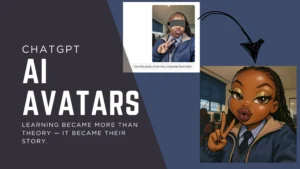
They then uploaded these images into Canva to design posters showing what they had learned about software licensing. It was incredible to see how creatively they could reflect understanding when given the tools.
Canva is a free online design tool that helps you make posters, slides, and graphics easily with templates and drag-and-drop tools.
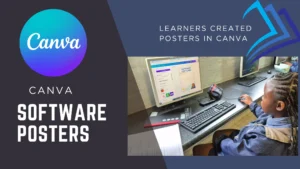
These posters were shared via Padlet, where everyone had the opportunity to vote for their favourite design. Not only did this reinforce content, but it gave learners ownership of their learning and a platform to express themselves.
Padlet is a digital wall where you can post and share content with others, like sticky notes online.
Going Further: Real-World Applications
With learners already engaged, we explored how understanding software licensing relates to study opportunities and real-world issues, including:
- How open-source software benefits start-ups
- The ethical implications of pirated programs
- Licensing in the context of remote learning and education access
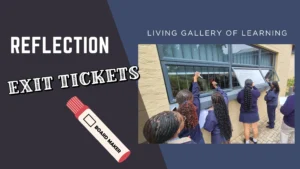
Reflection: Exit Tickets on Windows
Finally, learners reflected on their learning by writing three takeaways from the lesson directly onto my classroom windows using whiteboard markers (yes – it washes off, relax Karen). These visible reflections turned the classroom into a living gallery of learning, sparking further conversations and peer feedback.
They say ‘Gekke en dwase skryf op mure en glase’ — but in my CAT class, we call it exit tickets and active learning.
Why This Worked
This lesson was not about teaching content — it was about guiding inquiry. By integrating AI tools, collaborative edtech, and learner voice, I transformed a traditional theory module into an experience rooted in curiosity, creativity, and critical thinking.
In our CAT classrooms, theory doesn’t have to be boring. It can be alive. It can be learner-led. And it can be memorable.
Toolbox Recap:
- Mr H (AI-powered virtual CAT teacher): For generating quiz questions from textbook content
- Kahoot: For prior knowledge testing
- Gamma: For presenting theory interactively
- ChatGPT + Canva: For creative poster synthesis
- Padlet: For peer sharing and voting
- Whiteboard markers: For exit ticket reflections