Games
Games Tools
Tools Exams
Exams Grade 10
 Grade 11
 Grade 12
 Resources
 Free Stuff
 Misc
Misc


Struggling to Come Up with Exam-Worthy CAT Theory Questions? Say No More, Teacher!
Let’s be honest — writing exam questions can sometimes feel like trying to get your printer to work five minutes before moderation. You’ve got the CAPS document open, Bloom’s taxonomy verbs all over your desktop, and somehow your caffeine level isn’t helping your creativity.
If you’ve ever found yourself thinking, “How do I even start turning this content into proper Bloom’s-aligned questions?” — then you’re about to have your mind blown.
Meet the Game-Changer: The CAT Theory Question Database by Matt Hains
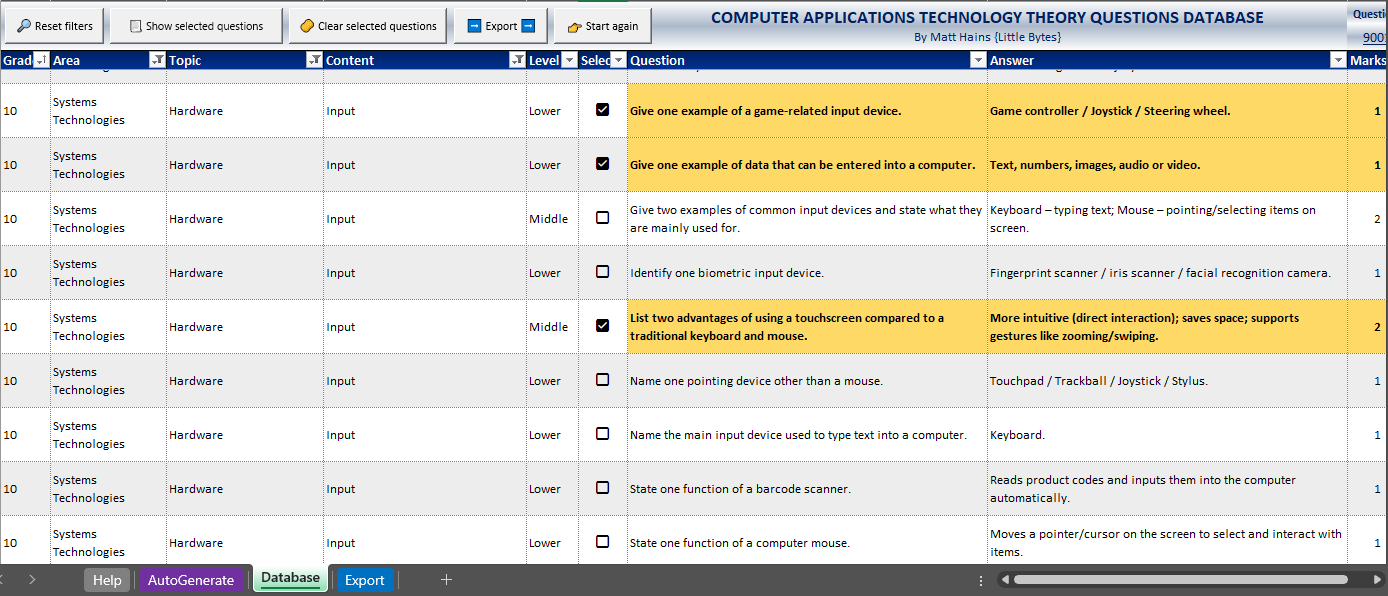
South African CAT legend Matthew Hains has created a database of over 9,000 CAT Theory questions, covering every single topic, area, and concept in the CAPS curriculum. This isn’t just another boring spreadsheet of questions — it’s an organised, interactive tool that helps you build scaffolded assessments in minutes. Everything is balanced perfectly with 30% Lower Order, 40% Middle Order, and 30% Higher Order questions.
And the best part? You can filter, sort, and select exactly what you need — and the system automatically puts it together into a worksheet that you can print, copy, or paste. No more endless formatting or retyping questions.
Area and Topic Focus: Everything in One Click
Each area of the CAPS curriculum opens up into its own list of topics, and within each topic are several content sections to choose from.
For example, when you open Information Management, it expands into an entire list of subtopics like:
- AI
- Data vs Information
- Electronic Reference Works
- Information Sources and Data Gathering
- Information vs Knowledge
- Problem-Solving Steps
- Role of Questions and Questioning
- Sifting Information
- Surveys
- Understanding the Problem or Task
…and that’s just one area!
With just one click, you suddenly have dozens of ready-to-use questions available for that specific subtopic — all properly aligned to Bloom’s levels. It’s structured in such a way that you’ll never accidentally skip a section or overlook a key concept again. Ek love dit! Nou kan ek niks vergeet nie — everything’s right there, ready to go.
My Honest Feedback (From a Teacher Who’s Been There)
I’ve always found creating theory questions to be one of the toughest parts of teaching CAT. It’s not that I don’t know the content — it’s the juggling of Bloom’s levels, mark allocation, and curriculum coverage all at the same time that’s enough to make anyone’s head spin.
Before this database, I’d have a million tabs open: Bloom’s verbs, examples of question types, CAPS, my notes, and a random file from 2018. Chaos! But with this database, everything is ready from the get-go. The balance of cognitive levels is already built in, and that gives me so much more confidence when I’m setting a paper. For the first time ever, I’m actually excited to create my own theory and practice papers. (I know — shocking, right?) And honestly, I can’t help but think how amazing it would be to have a SAGS version of this tool one day too — imagine how much easier that would make life for IEB teachers as well! With how polished, practical, and user-friendly this database already is, it would translate beautifully.
And get this — when you click “Export”, the database automatically generates a beautifully formatted sheet showing not just your questions and answers, but also the Bloom’s level for each one. That means when it’s time to fill in those freaking daunting analysis grids, you’re sorted. No guessing, no colour-coding at midnight — just neat, accurate data at your fingertips.
Absolute game-changer
Oh, and if you ever get stuck or need a quick refresher, there’s even a dedicated Help tab built right into the database. It walks you through how everything works.
The Auto-Generator Tool: For When You Just Can’t Even
We all have those weeks when life’s a bit much — reports due, learners absent, and the Wi-Fi dropping for no reason. That’s when the Auto-Generator tool saves the day. Just pick your grade, area, and topic, and it automatically selects a full set of questions for you — neatly arranged from lower to higher order, complete with answers and mark allocations. You can literally create a paper before your next Teams meeting starts.
Want Even More? There’s an Add-On for That!
If 9,000 questions aren’t enough (because we teachers are extra like that), there’s also a Paths Workbook add-on.
It contains over 300 database “paths” — covering every CAPS topic — and works hand-in-hand with Matt’s CAT Theory Question Database Assistant on ChatGPT. You just copy a path, paste it into the assistant, and it generates 27 unique questions (3 LOT, 3 MOT and 3 HOT) instantly. More variety, more creativity, less admin stress.
In a Nutshell
- If you’re tired of spending hours making theory papers from scratch and still stressing about whether you’ve covered everything, this is your sign.
- With over 9,000 ready-made questions, an Auto-Generator, and a Paths Workbook add-on, Matt Hains has created the ultimate CAT teacher toolkit.
- I can honestly say — I’ll never go back to the old way. Everything’s organised, CAPS-aligned, Bloom’s-balanced, and lekker easy to use.
- And now that those analysis grids basically complete themselves? Pure bliss.
So yes, I’m officially that teacher who’s excited to set papers now. Thanks, Matt — you’ve made assessments fun again!