CAT Is “Easy”?

Funny. That’s Usually Said by Someone Crying Over Excel at 11pm.

By Ruval Gouws

There’s a phrase I hear every single year:

“I’m taking CAT because it’s easy.”

And honestly? That sentence ages about as well as milk left in a schoolbag during summer.

The idea that CAT (Computer Applications Technology) is an “easy subject” usually comes from people only seeing the surface level of it.

“Oh, you just work on computers.”

Yes. And surgeons “just use knives”.

People assume CAT is basically typing documents while sipping juice and relaxing in air conditioning. Meanwhile, CAT teachers are watching learners battle Excel formulas like they’re trying to defuse a bomb with 3% battery life left.

Using Technology ≠ Understanding Technology

One of the biggest reasons for the stigma is simple: students grow up around technology.

They use phones every day. They live on laptops. They can create TikToks faster than most adults can open a PDF.

So naturally, they think:

“CAT will be simple. I already know computers.”

But using technology socially is completely different from understanding how it actually works.

Knowing how to post a photo with a trending sound does not magically prepare you for:

– advanced spreadsheets,
– database relationships,
– file management,
– formulas,
– cyber security,
– HTML,
– or information management.

That’s like saying:
“I watch Formula 1, therefore I can rebuild an engine.”

CAT quickly humbles people.

Especially when Excel starts asking questions in hieroglyphics.

The Dangerous “Easy Option” Label

Some schools unintentionally make the problem worse by marketing CAT as:

“The easier alternative.”

That creates completely unrealistic expectations.

Students walk into Grade 10 thinking they’ve selected the academic equivalent of a spa day.

Then reality arrives.

Suddenly there are:

– PAT deadlines,
– theory exams,
– complex spreadsheets,
– databases,
– research tasks,
– professional reports,
– and practical assessments that somehow all happen in the same week.

And then comes the famous sentence:

“Sir, why is this so much work?”

Because CAT is not just “computer time”.

It combines:
– theory,
– problem-solving,
– digital literacy,
– practical software skills,
– research,
– and time management.

That’s a serious skill set.


The Irony Nobody Talks About

Here’s the strange part.

The modern world runs almost entirely on digital systems, yet computer-related subjects are still sometimes treated as “light” subjects.

Meanwhile, nearly every career today requires:
– spreadsheets,
– online collaboration,
– digital communication,
– data handling,
– and problem-solving using technology.

In other words, the exact things CAT teaches.

A learner who can confidently:
– organise data,
– create professional documents,
– troubleshoot problems,
– manage information,
– and present work properly

is already developing workplace-ready skills.

That matters.

A lot.

 Let’s Talk About Excel Trauma

If CAT is truly “easy”, I have one small question:

Why do so many students suddenly enter a spiritual crisis when VLOOKUP appears?

Excel has humbled some of the strongest learners I know.

You can physically see confidence leave the body when:
– formulas stop working,
– the totals don’t balance,
– or the spreadsheet starts showing ######## instead of numbers.

And don’t even mention databases.

Nothing tests emotional stability quite like relationships that refuse to link properly five minutes before submission.

CAT Is a Skill Subject

This is something students need to understand earlier.

CAT is not a memorisation subject.

It’s a skill subject.

It’s similar to:
– Accounting,
– Engineering Graphics and Design,
– design subjects,
– and IT.

You improve through:
– practice,
– repetition,
– troubleshooting,
– and applying skills consistently.

You cannot cram practical competence overnight.

Unfortunately, many learners discover this at approximately 1:14am the night before a PAT is due.

 A Good PAT Is Actually Impressive

A properly completed PAT deserves far more respect than it often gets.

Students create:
– professional reports,
– advanced spreadsheets,
– dashboards,
– forms,
– databases,
– queries,
– and websites.

That’s real-world work.

Schools should showcase CAT projects more often because many learners produce genuinely impressive things when they apply themselves properly.

CAT and Careers

Another misconception is that CAT “doesn’t lead anywhere”.

That could not be further from the truth.

CAT builds transferable digital skills that connect directly to careers such as:
– data analysis,
– marketing,
– education,
– office administration,
– business analysis,
– project management,
– entrepreneurship,
– web design,
– and information systems.

Even learners who never work in a tech-related field still benefit massively from digital competence.

The workplace rewards people who can:
– organise information well,
– communicate professionally,
– solve digital problems,
– and adapt quickly.

Those are CAT skills.

The Mindset Shift We Need

Instead of learners saying:

“I took CAT so I can chill.”

I’d love to hear:

“I took CAT to become digitally capable.”

Because the students who genuinely work hard in CAT often become the people who:
– manage projects efficiently,
– create polished work,
– solve problems independently,
– and quietly become indispensable in workplaces later on.

Not bad for the “easy subject”.

So the next time someone says CAT is simple, hand them an advanced Excel spreadsheet, a broken database relationship, and a PAT deadline.

Then stand back and observe nature taking its course.

Stop Teaching the Textbook. Start Teaching Through the PAT.

Every year, the CAT PAT is treated like that dramatic plot twist nobody prepared for

We calmly “cover” theory from the textbook…
We teach formulas.
We do isolated database exercises.
We tick syllabus boxes.

And then suddenly — boom.

“Okay class, now independently complete a complex, integrated, multi-phase practical project that requires critical thinking, research, referencing, integration and professional reporting. Good luck!”

Cue mild panic. From learners. And teachers.

But what if we flipped the script?

What if the PAT wasn’t something we survive at the end of the year — but something we teach through from the beginning?

The CAT PAT is not extra work.

It is literally the most authentic teaching opportunity in the entire Grade 12 syllabus.

The PAT Is Already a Complete Teaching Framework (It’s Basically a Free Curriculum Gift)

If you actually unpack the PAT requirements, something slightly mind-blowing happens.

It already includes:

– Research skills
– Critical thinking
– Data handling
– Spreadsheet processing
– Database design
– Application integration
– Formal report writing
– Referencing
– Evaluation and reflection

In other words… everything we try to teach separately.

Instead of:

– “Today we’re doing VLOOKUP from page 143.”
– “Today we’re learning about queries. Don’t ask why.”
– “Today we’re inserting a table of contents for absolutely no real reason.”

We could be saying:

– “Today we’re using VLOOKUP to solve a real problem in your PAT.”
– “Today we’re building a query that answers one of your research questions.”
– “Today we’re setting up your final report properly so you don’t cry in September.”

That tiny shift changes everything.

Phase 1: Teach Research Properly (Not Just Advanced Copy-Paste)

Let’s be honest.

Phase 1 often becomes:
– Vague task definition ✔
– 15 questions that all start with “What is…” ✔
– Three websites copied with enthusiasm ✔

But Phase 1 is actually gold.

Learners must:

– Define the task in their own words
– Create a clear key question
– Generate 15 varied questions
– Use at least three different sources
– Validate information
– Reference correctly

This is where real teaching happens.

You can:
– Teach the difference between weak and strong questions
– Show how to spot a dodgy website in 30 seconds
– Model proper Harvard referencing (without everyone guessing the punctuation)
– Workshop task definitions before they’re marked

Instead of marking 30 weak Phase 1 submissions and sighing heavily…

You refine them in class.

Marks improve. Quality improves. Blood pressure improves.


 Phase 2: Teach Practical Skills in Context (a.k.a. “Why Are We Even Doing This?” Solved)

Phase 2 Task 1 is not about “doing Excel.”

It’s about solving a data problem.

When learners understand:
– Why they are building a Pivot Table
– Why they are cleaning data
– Why a formula matters

— engagement changes instantly.

When Access tables reflect their own research data, database design stops feeling like a punishment exercise and starts making sense.

The PAT allows you to:

– Demonstrate a feature
– Let learners apply it immediately
– Walk around and fix mistakes in real time
– Stop errors before they multiply like Excel circular references

That is far more powerful than textbook drills.

The Final Report: Where Word Either Shines or Breaks Spirits

The Final Report requires:

– Structured headings
– Automatic table of contents
– Integration explanation
– Data analysis
– Reflection
– Bibliography

Instead of teaching Word features randomly in March because “it’s on the syllabus,” you can teach them exactly when learners need them.

– Section breaks while setting up the report
– Styles while building the TOC
– Captions while inserting graphs
– Referencing tools in a real research context

Suddenly Word isn’t just “formatting stuff.”

It’s professional communication.

And learners can actually see why it matters.

 Real-Time Feedback = Fewer September Meltdowns

When the PAT becomes your live teaching framework:

– Weak task definitions are fixed early
– Poor questions improve before research starts
– Incorrect formulas don’t get repeated 47 times
– Database relationships are corrected before submission
– Referencing errors don’t snowball

The result?

– Better quality work
– Higher independence
– Stronger final marks
– Much less last-minute chaos

And fewer “Ma’am, my file is corrupt” conversations.


 A Structured Tool to Support Teachers (Because We Also Need Backup)

To support this approach, I created a PAT Support App designed to:

– Clearly explain all PAT phases and tasks
– Provide guidance without encouraging copying
– Focus learners on structure and assessment criteria
– Encourage independent, logical progress
– Align with what is actually assessed

It doesn’t replace teaching.

It supports it.

Teachers can:
– Project sections during lessons
– Use it while explaining tasks
– Encourage independent use
– Share it for structured guidance

You’re welcome to use or share it:

Click here to access it.

Feedback from teachers is very welcome (especially the “why didn’t we think of this earlier?” kind).

My Final Thought for CAT Teachers

The PAT is not an administrative headache.

It is the most real-world, skills-based part of the CAT curriculum.

If we shift from:

“Let’s finish the textbook before the PAT.”

to:

“Let’s teach through the PAT.”

We turn a stressful end-of-year scramble into a guided, structured learning journey.

And honestly?

That’s what CAT was meant to be all along.

Struggling to Come Up with Exam-Worthy CAT Theory Questions? Say No More, Teacher!

Let’s be honest — writing exam questions can sometimes feel like trying to get your printer to work five minutes before moderation. You’ve got the CAPS document open, Bloom’s taxonomy verbs all over your desktop, and somehow your caffeine level isn’t helping your creativity.

If you’ve ever found yourself thinking, “How do I even start turning this content into proper Bloom’s-aligned questions?”then you’re about to have your mind blown.

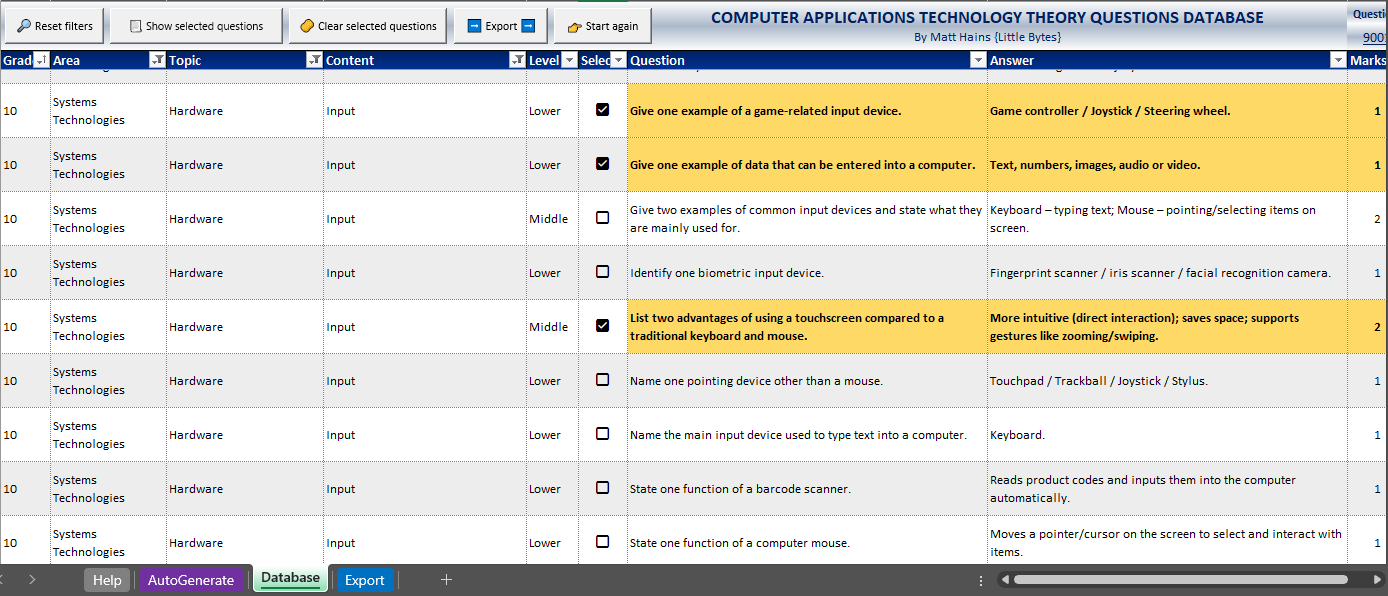
Meet the Game-Changer: The CAT Theory Question Database by Matt Hains

South African CAT legend Matthew Hains has created a database of over 9,000 CAT Theory questions, covering every single topic, area, and concept in the CAPS curriculum. This isn’t just another boring spreadsheet of questions — it’s an organised, interactive tool that helps you build scaffolded assessments in minutes. Everything is balanced perfectly with 30% Lower Order, 40% Middle Order, and 30% Higher Order questions.

And the best part? You can filter, sort, and select exactly what you need — and the system automatically puts it together into a worksheet that you can print, copy, or paste. No more endless formatting or retyping questions.

Area and Topic Focus: Everything in One Click

Each area of the CAPS curriculum opens up into its own list of topics, and within each topic are several content sections to choose from.

For example, when you open Information Management, it expands into an entire list of subtopics like:

  • AI
  • Data vs Information
  • Electronic Reference Works
  • Information Sources and Data Gathering
  • Information vs Knowledge
  • Problem-Solving Steps
  • Role of Questions and Questioning
  • Sifting Information
  • Surveys
  • Understanding the Problem or Task

…and that’s just one area!

With just one click, you suddenly have dozens of ready-to-use questions available for that specific subtopic — all properly aligned to Bloom’s levels. It’s structured in such a way that you’ll never accidentally skip a section or overlook a key concept again. Ek love dit! Nou kan ek niks vergeet nie — everything’s right there, ready to go.

My Honest Feedback (From a Teacher Who’s Been There)

I’ve always found creating theory questions to be one of the toughest parts of teaching CAT. It’s not that I don’t know the content — it’s the juggling of Bloom’s levels, mark allocation, and curriculum coverage all at the same time that’s enough to make anyone’s head spin.

Before this database, I’d have a million tabs open: Bloom’s verbs, examples of question types, CAPS, my notes, and a random file from 2018. Chaos! But with this database, everything is ready from the get-go. The balance of cognitive levels is already built in, and that gives me so much more confidence when I’m setting a paper. For the first time ever, I’m actually excited to create my own theory and practice papers. (I know — shocking, right?) And honestly, I can’t help but think how amazing it would be to have a SAGS version of this tool one day too — imagine how much easier that would make life for IEB teachers as well! With how polished, practical, and user-friendly this database already is, it would translate beautifully.

And get this — when you click “Export”, the database automatically generates a beautifully formatted sheet showing not just your questions and answers, but also the Bloom’s level for each one. That means when it’s time to fill in those freaking daunting analysis grids, you’re sorted. No guessing, no colour-coding at midnight — just neat, accurate data at your fingertips.

Absolute game-changer

Oh, and if you ever get stuck or need a quick refresher, there’s even a dedicated Help tab built right into the database. It walks you through how everything works.

The Auto-Generator Tool: For When You Just Can’t Even
We all have those weeks when life’s a bit much — reports due, learners absent, and the Wi-Fi dropping for no reason. That’s when the Auto-Generator tool saves the day. Just pick your grade, area, and topic, and it automatically selects a full set of questions for you — neatly arranged from lower to higher order, complete with answers and mark allocations. You can literally create a paper before your next Teams meeting starts.

Want Even More? There’s an Add-On for That!
If 9,000 questions aren’t enough (because we teachers are extra like that), there’s also a Paths Workbook add-on.

It contains over 300 database “paths” — covering every CAPS topic — and works hand-in-hand with Matt’s CAT Theory Question Database Assistant on ChatGPT. You just copy a path, paste it into the assistant, and it generates 27 unique questions (3 LOT, 3 MOT and 3 HOT) instantly. More variety, more creativity, less admin stress.

In a Nutshell

  • If you’re tired of spending hours making theory papers from scratch and still stressing about whether you’ve covered everything, this is your sign.
  • With over 9,000 ready-made questions, an Auto-Generator, and a Paths Workbook add-on, Matt Hains has created the ultimate CAT teacher toolkit.
  • I can honestly say — I’ll never go back to the old way. Everything’s organised, CAPS-aligned, Bloom’s-balanced, and lekker easy to use.
  • And now that those analysis grids basically complete themselves? Pure bliss.

So yes, I’m officially that teacher who’s excited to set papers now. Thanks, Matt — you’ve made assessments fun again!

Get your copy of the database now!

Burned Out and Logged On: The Untold Struggles of a CAT Teacher

We teach learners how to survive the digital world. But who helps us survive it?
As CAT teachers, we often carry more than just lesson plans. We carry cables, crash reports, forgotten passwords, corrupted files, broken printers, and late-night panic messages from learners who “swear they saved their PAT.”

We’re the silent force keeping the school’s tech running while also juggling practical assessments, intensive marking, and theory that’s constantly evolving in a world where new tech pops up faster than we can update a slideshow.

Burnout in education is real. But CAT teacher burnout? It’s a special kind of fatigue.

The Reality Behind the Screen

You’re always “on call.” Even if you’re not the official IT person, your name is the one whispered when someone’s projector fails or when CAPS LOCK won’t turn off. Your assessments take triple the time to mark. Screenshots, spreadsheet formulas, Word formatting, database queries—all checked manually. No memo can do it for you. You teach learners who know less than you think—and others who think they know more than they do. That balance is exhausting.

And let’s not forget theory. Trying to explain what “non-volatile memory” is while half your class is mentally on TikTok.

The Hidden Mental Load

Beyond lessons and marking, you’re constantly:
1.  Debugging projects
2.  Designing engaging content to keep theory exciting
3.  Updating your own skills to stay relevant
4.  Managing device policies, classroom management, digital ethics
5.  Wondering if what you teach will still be relevant in five years

All while feeling invisible. Because CAT is often treated as a “soft subject” when in fact, it lays the foundation for 21st-century learning.

So, What Now?

Here’s what I’ve started doing—and maybe it helps you too:

1. Set Boundaries With Tech
You don’t have to answer WhatsApp messages about the PAT at 10 PM. Model digital wellbeing. Set “offline” hours and stick to them.

2. Automate Where You Can
Use tools like Google Forms, ChatGPT, Quizizz, or self-marking spreadsheets to lighten your load.

3. Find Your CAT Community
We’re a rare breed. But we exist. Start a WhatsApp group with other CAT teachers, share resources, or just vent safely.

4. Give Yourself Credit
What you do matters. You are giving learners the tools to function in a digital world. Celebrate small wins. Even getting everyone to name their files correctly is a win!

5. Talk About It
We need to address burnout in tech education. Speak up. Write posts. Tell your HOD when things are too much. Help others understand what you actually do. Burnout doesn’t mean you’re weak. It means you’ve been strong for too long—while rebooting 15 laptops, calming a crying Grade 12 whose Access file won’t open, and still delivering a killer lesson on networks.

Take the break. Log off. Rest. Your learners need you whole.

– Ruval Gouws
“Just because it’s digital, doesn’t mean it doesn’t drain us.”